Google My Business (now Google Business Profile) is one of the most powerful tools for local businesses in Dubai and beyond. When optimized, it can help you attract nearby customers, build trust, and drive calls or visits directly from Google Search and Maps.
Yet, many business owners set up a profile and expect leads to flow in — only to be disappointed. If your Google Business Profile isn’t generating the results you expected, the problem often lies in how it’s set up and maintained.
Below are 10 common reasons your profile isn’t converting — and exactly how to fix them.
1. Incomplete Business Information
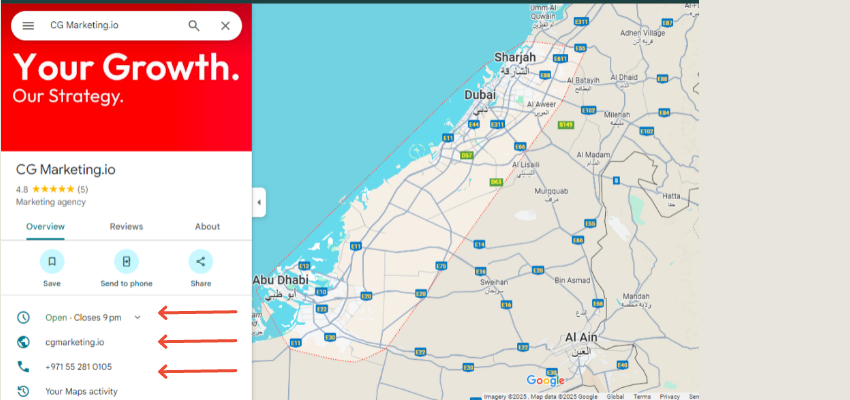
If your profile is missing key details — such as business hours, contact number, or website — potential customers may skip contacting you altogether.
Solution:
Fill out every field in your profile: address, phone, website, business hours, service areas, and categories.
Double-check accuracy to avoid confusing customers.
2. Poor Category Selection
Choosing the wrong primary category can prevent your business from appearing in the right searches.
Solution:
Select the most relevant primary category for your core offering.
Add secondary categories for additional services.
Example: If you’re offering SEO services in Dubai, select “Internet Marketing Service” as the primary category and add “Marketing Consultant” or “Advertising Agency” as secondary ones.
3. No or Few Customer Reviews
A lack of reviews makes your business look less credible compared to competitors.
Solution:
Ask satisfied customers for reviews.
Respond to every review — positive or negative — to show engagement.
📖 Related Read: Google My Business to Improve Local SEO
4. Low-Quality or No Photos
A profile without visuals can feel uninviting. People want to see your location, products, and team.
Solution:
Upload high-resolution images of your store, staff, and services.
Update photos regularly to keep the profile fresh.
5. Inconsistent NAP (Name, Address, Phone)
If your NAP details differ across the web, Google may lower your visibility.
Solution:
Ensure your business name, address, and phone number are identical on your website, social profiles, and online directories.
6. Not Posting Updates
Google favors active profiles. If you’re not posting updates, you’re missing a chance to engage customers.
Solution:
Share weekly updates, promotions, or new products via the “Posts” feature.
Highlight special events, offers, or seasonal campaigns.
7. Ignoring Keywords in Your Profile
Your business description helps Google understand your services. Without relevant keywords, you may not rank for important terms.
Solution:
Naturally include location-based and service-specific keywords in your description.
Avoid keyword stuffing — keep it readable.
8. No Products or Services Listed
Not adding your services or product catalog limits the information potential customers can see.
Solution:
Use the “Products” or “Services” section to list your offerings with descriptions and prices (if applicable).
9. Ignoring Q&A Section
Leaving customer questions unanswered can create a bad impression.
Solution:
Regularly monitor and respond to questions.
Add common FAQs proactively to provide instant answers.
10. Not Tracking Performance
Without monitoring your profile’s performance, you can’t know what’s working.
Solution:
Use the “Insights” section to track views, clicks, and calls.
Adjust your strategy based on what’s driving engagement.
Final Thoughts
Your Google Business Profile is more than just a digital business card — it’s a lead-generation tool. By ensuring it’s complete, optimized, and regularly updated, you can significantly improve your local SEO and attract more customers.
Next Step: Don’t just set it and forget it. Treat your profile as an active marketing channel.
📌 Related Reads for Further Optimization:
FAQ
Q1: How long does it take to see results from Google Business Profile optimization?
A: Usually, you can see improvements within 2–4 weeks, but it depends on competition and activity.
Q2: Can I manage my Google Business Profile without hiring an agency?
A: Yes, but an experienced SEO agency can help you rank faster and handle technical aspects.
Q3: Do reviews impact rankings?
A: Yes, quantity, quality, and recency of reviews are all ranking factors.
Q4: Is Google Business Profile free to use?
A: Yes, creating and maintaining a profile is free — but optimizing it requires consistent effort.